
In an era where social media and e-commerce are increasingly intertwined, understanding tools that bridge this gap is crucial for business growth. This is where the concept of what is Facebook Shop becomes essential. This feature allows businesses to create a native online store directly within Facebook and Instagram. This guide will explore its core functions, benefits, and how you can leverage it to drive sales directly from your social profiles.
Contents
What is a Facebook Shop beyond the basics
At its core, a Facebook Shop is a fully integrated, customizable digital storefront that lives directly on your Facebook Business Page and Instagram profile. It represents a fundamental shift, moving commerce from external websites into the native social environment. This tool is Meta’s answer to the growing demand for seamless shopping, allowing customers to discover and purchase products without ever leaving the app. It transforms your social presence from a simple communication channel into a powerful, persistent sales engine.
This storefront is more than a simple product gallery; it is a strategic asset. By centralizing your sales funnel within the Meta ecosystem, you reduce purchase friction and capture impulse buys more effectively. Understanding how to leverage this requires a solid foundation, much like knowing the role of a specialized Facebook agency account for scaling operations. The Shop acts as a unified hub for your commercial activities across platforms.
- Unified Presence: A single shop serves both Facebook and Instagram, ensuring brand consistency.
- Native Experience: It offers a fast, mobile-first interface that feels intuitive to social media users.
- Cost-Free Setup: Launching your Shop is free, with fees only applying to native checkout transactions where available.
Core features and functionalities of a Facebook Shop
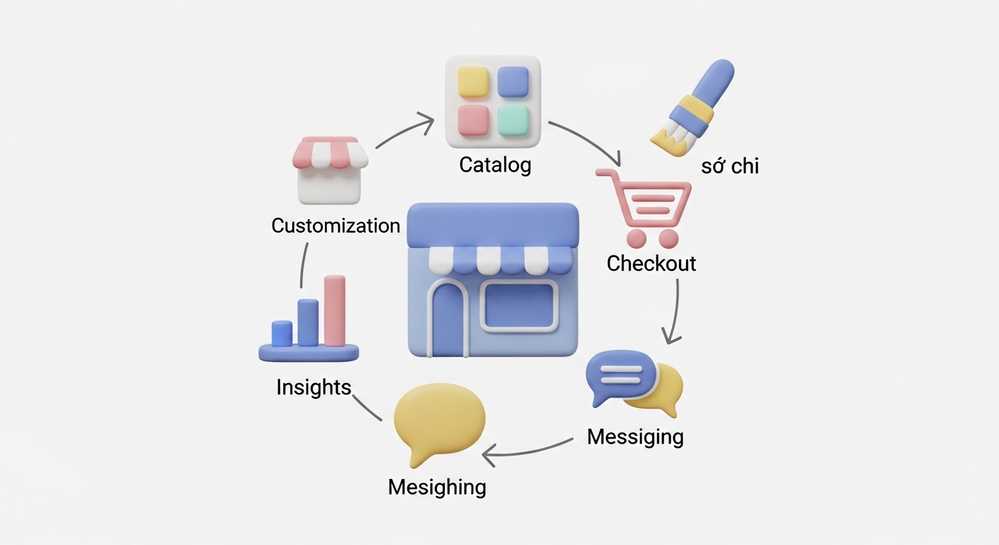
A Facebook Shop is more than a product gallery; it is powered by a suite of tools designed to manage and promote products effectively. Understanding these features is key to leveraging the platform’s full potential. Mastering these components is fundamental for anyone looking to undefined through social commerce, turning passive viewers into active customers.
Product catalog integration
The product catalog is the foundation of your Shop. It stores all essential product information like images, descriptions, prices, and inventory levels. You can create this catalog manually within Meta Commerce Manager or sync it directly from e-commerce platforms like Shopify. This dynamic connection ensures your product data remains accurate and consistently up-to-date across the ecosystem.
Customizable storefront
You have significant control over your Shop’s visual identity. Organize products into curated collections, customize layouts with branded banners, and adjust styles to match your brand. This transforms a generic listing into a unique, branded shopping destination. It allows you to guide the customer journey and highlight key products effectively, reinforcing your brand at every step.
Checkout and support integration
Shops offer flexible checkout options to reduce friction. Customers can purchase directly in-app in enabled regions or be seamlessly directed to your website. The platform also integrates with Messenger and Instagram Direct. This allows customers to ask questions from a product page, connecting sales with real-time customer service.
The key benefits for businesses of all sizes
For businesses, adopting a Facebook Shop is a strategic move that extends far beyond opening another sales channel. It offers distinct advantages specifically tailored to the social media context, capable of driving significant growth. These benefits are designed to convert passive browsing into active purchasing by leveraging the platform’s native environment. The insights gained can directly influence your advertising strategy and help you understand what constitutes a undefined.
- Reduces Purchase Friction: By containing the entire shopping journey within the app, you minimize the clicks and steps required to buy. This seamless process dramatically reduces cart abandonment rates.
- Boosts Organic Discovery: Products from your Shop can appear organically in feeds, Stories, and the dedicated Shop tab. This increases the chances of new customers finding your brand without direct ad spend.
- Builds Trust and Engagement: The Shop is connected to your Business Page, giving customers easy access to reviews and social proof. Integrated messaging allows for direct interactions that build loyalty.
- Provides Actionable Insights: Commerce Manager provides valuable data on product performance and customer behavior. These insights help you make informed decisions to optimize your offerings and marketing efforts.
Facebook Shop vs Facebook Marketplace vs Instagram Shopping

How a Facebook Shop differs from other tools
To maximize your social commerce strategy, it is crucial to distinguish between Meta’s key selling tools. Facebook Shop, Facebook Marketplace, and Instagram Shopping each serve a unique purpose, and understanding their roles is vital for success. Choosing the right platform is especially important when undefined for a cohesive brand presence. The table below clarifies these distinctions.
| Feature | Facebook Shop | Facebook Marketplace | Instagram Shopping |
|---|---|---|---|
| Primary User | Registered businesses (B2C) | Individuals (C2C) and local businesses | Visually-focused businesses (B2C) |
| Business Model | Branded, scalable storefront | Community-based classifieds | Content-driven product discovery |
| Customization | High: custom collections and branding | None: standardized listing format | Moderate: integrated into profile and content |
| Primary Goal | Build a permanent brand shopping destination | Facilitate one-off, often local, sales | Make visual content like posts and Reels shoppable |
How to set up your first Facebook Shop

A simplified guide to launching your shop
Getting started with your own storefront is a straightforward process managed entirely within Meta Commerce Manager. Following these steps will transform your theoretical knowledge of what a Facebook Shop is into a tangible, revenue-generating asset. Ensure you are an admin of the Business Account that owns the Facebook Page or Instagram profile before you begin.
- Access Commerce Manager: Navigate to the platform and click Add Shop. This is the central hub for all your commerce activities on Meta.
- Choose Your Selling Channels: Select whether you want your shop to appear on Facebook, Instagram, or both to create a unified presence.
- Select a Checkout Method: Choose how customers pay. Options include seamless in-app checkout, redirection to your website, or completing sales via messaging.
- Connect Your Business Assets: Link the specific Facebook Business Page and Instagram business profile that will represent your shop.
- Create or Link Your Catalog: Add products by building a new catalog or syncing an existing one from a platform like Shopify to ensure inventory is always current.
- Review and Submit: Double-check all your settings, accept the Merchant Agreement, and submit your shop for review by Meta.
Facebook Shop represents a crucial evolution in social commerce, transforming a brand’s social profile into a fully functional and dynamic storefront. By removing barriers in the customer journey, it enables seamless discovery and purchase directly where your audience is most engaged. To maximize your reach and ensure stable advertising campaigns for your new shop, consider using a reliable service. Explore options to Rent Facebook Account and start scaling your business effectively.